Lazy Render Effects
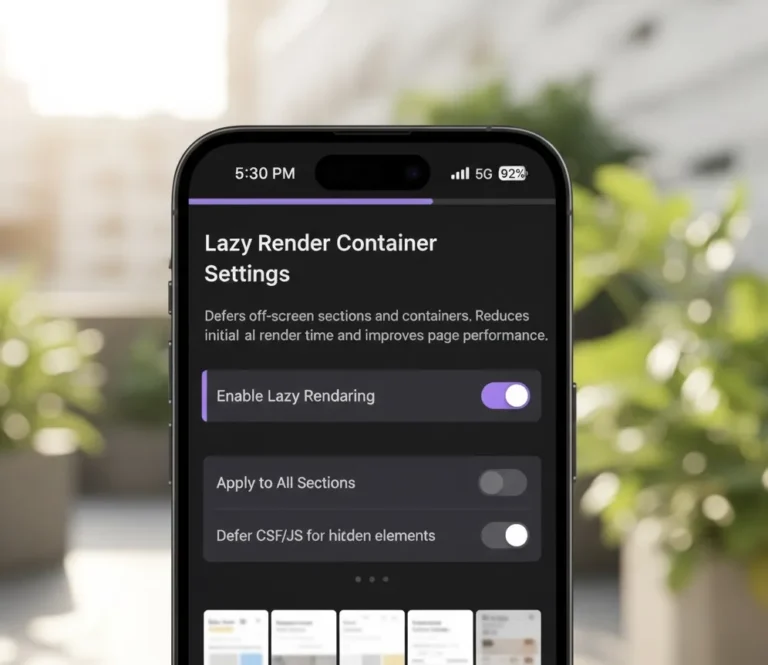
Lazy Render Container Effects for Elementor Plugin
Dramatically improve page performance by deferring the rendering of selected off-screen sections and containers until they approach the viewport. Uses CSS content-visibility to skip layout and paint calculations for hidden sections, with a configurable preload distance ensuring smooth entry. Set an estimated section height to prevent layout shift, and disable on mobile with a single toggle. A must-have for content-heavy pages.
Apply to below-the-fold sections on long sales pages to improve initial load speed and Core Web Vitals scores. Defer heavy widget sections like carousels and video players until users scroll near them. Use on long blog articles with multiple media-rich sections to keep Time to Interactive low. Apply to secondary sections on homepage templates with many Elementor widgets – and many more page performance optimisation scenarios.
Our Most Viewed Widgets
(FAQS)
Frequently asked questions
Is this widget compatible with all elementor layouts?
Yes. All widgets are designed to work with sections and columns (older elementor layouts) and containers (newer elementor layouts). They follow Elementor’s native structure so they integrate smoothly with existing layouts.
Will this widget negatively affect website performance?
No. Every widget is built to be lightweight and optimized for speed. They only load the scripts and styles required for the widget being used, helping maintain fast page performance on wordpress websites.
Can i customize the design of the widget?
Yes. All widgets include styling controls so you can adjust typography, spacing, colors, and layout directly inside the Elementor editor without writing code.
What is the difference between the free and pro widgets?
The free widgets provide essential functionality, while the Pro widgets include more advanced features, styling options, animations, and dynamic capabilities for building more complex layouts.
Will it work with my theme?
Absolutely. Our widgets are designed to work with most well coded WordPress themes. Since they use Elementor’s standard controls and scaling system, they inherit typography and layout settings from your theme automatically.
How it works
Installing and using our plugin is simple. In three easy steps you can start designing professional websites.
- Purchase the pro license
- Your purchase comes with the pro plugin in a zip file to download, and your license key.
- Upload the pro plugin to your wordpress website
- You must have the Free Lite PMAKit plugin installed if you do not already. The Free Lite version can be downloaded here or on wordpress.
- Enter your license key in the PMAKit plugin dashboard
- Toggle the options you wish to use and start designing.
What Our Users Say
Click on any avatar to read their full story

We'll build your website for you.
You’ve got a business to run. Not everyone has the time or desire to build their website. Whether you need a landing page that converts, a full ecommerce store, or a website that looks ten times bigger than you are – we’ve got you.
Massive Addons Kit for Elementor by Pretpot provides you with multiple free and pro widgets to design professional websites.